
API overview
API overview
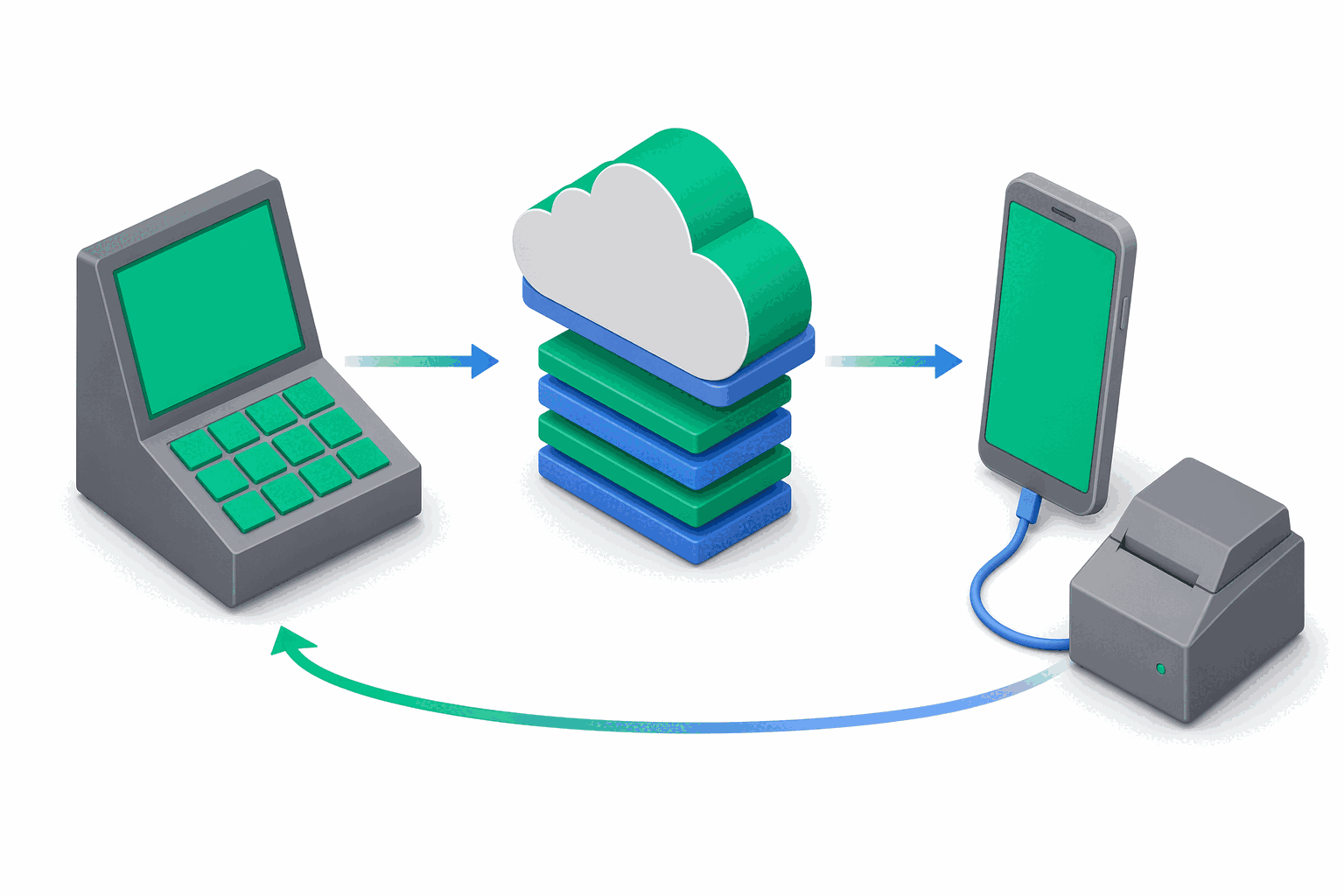
The e-bon API is a JSON-over-HTTPS REST API for POS systems and back-office integrations that need to dispatch fiscal receipts, manage AMEF devices and read fiscal reports without implementing each printer's native protocol themselves. It is the same API the e-bon Portal and the E-BON mobile app use internally.
Architecture in one breath
The API is command-queue oriented. A POS issues a fiscal command (for example print this receipt) over REST; the server queues it and dispatches it over a WebSocket to the E-BON mobile app sitting next to the printer; the app translates the command into the printer's native protocol; the result flows back through the same chain and is then available either by polling the command or by listening on the events WebSocket.
POS  ──HTTPS──▶  api.e-bon.ro  ──WSS──▶  E-BON mobile app  ──TCP/BT/Serial──▶  AMEF printer
                                                                                  │
POS  ◀─────── poll / events WSS ───────  e-bon server  ◀────── result ─────────────┘
The practical consequence: most fiscal operations are asynchronous. POST /api/v1/commands returns immediately with status: "pending" and you either poll GET /api/v1/commands/{commandId} or subscribe to command.completed / command.failed events.
Base URL
All endpoints live under https://api.e-bon.ro. Every example in the docs uses this base URL.
Versioning
The API is currently on v1. Every routed endpoint is prefixed with /api/v1/:
GET /api/v1/devices HTTP/1.1
Host: api.e-bon.ro
Authorization: Bearer ebon_live_<orgId>_<32-hex>
Accept: application/json
There is no minor-version negotiation — the version is in the path. Breaking changes ship under a new prefix (/api/v2/...); additive, backwards-compatible changes ship in place under /api/v1/.
Content type
- Request bodies:
application/json(UTF-8). SendContent-Type: application/jsonon everyPOST/PATCH/PUT. - Responses:
application/json(UTF-8) for everything except the JE XML download endpoint, which returnsapplication/xmlas an attachment. - All timestamps in request / response bodies are ISO 8601 strings (for example
"2026-04-09T08:10:00.000Z").
Error envelope
Every error response — whether from validation, auth, business logic or an unhandled crash — follows the same shape:
{
  "error": {
    "code": "VALIDATION_ERROR",
    "message": "Request validation failed",
    "details": [
      { "path": "items[0].vatGroup", "message": "vatGroup must be one of: VAT1..VAT16, exempt" }
    ]
  }
}
error.code— a stable string identifier from the catalogue below. Always present.error.message— a human-readable message in English. Suitable for logging; do not parse.error.details— optional. Present on validation failures (Zod field errors) and on a handful of other errors that need structured payloads. Shape depends on the error code.
429 RATE_LIMIT_EXCEEDED response from the global rate limiter is currently emitted as a flat object ({ "code": "RATE_LIMIT_EXCEEDED", "message": "...", "status": 429 }) instead of the wrapped { "error": { ... } } envelope. Treat both shapes as equivalent until the API is normalised; match on the code field, not on the wrapper.HTTP error code catalogue
These are the codes returned in error.code by the e-bon HTTP API. They are the wire-level codes — distinct from the device / fiscal-driver ErrorCode enum (E100–E901) returned inside command results and SDK exceptions, documented in the next section.
| Code | HTTP | When you see it |
|---|---|---|
UNAUTHORIZED | 401 | Missing or invalid API key / JWT, or the key is inactive. |
TOKEN_EXPIRED | 401 | JWT access token expired — refresh it. |
FORBIDDEN | 403 | Authenticated, but the key's scopes do not cover this endpoint. |
VALIDATION_ERROR | 400 | Body / query failed Zod validation. details lists { path, message } per field. |
BAD_REQUEST | 400 | Malformed request that is not specifically a schema violation. |
NOT_FOUND | 404 | Addressed resource (device, command, receipt, report, key) does not exist for your organization. |
CONFLICT | 409 | Operation conflicts with current state (for example cancelling a command that is already completed). |
UNPROCESSABLE_ENTITY | 422 | Request was understood but cannot be processed in the current business state. |
RATE_LIMIT_EXCEEDED | 429 | You exceeded the rate limit window. See Rate limits. |
TIER_LIMIT_EXCEEDED | 403 | Your organization's plan does not allow this action (for example creating an API key on the Free plan). |
INTERNAL_ERROR | 500 | Unhandled server error. Includes a request ID in logs; safe to retry idempotent operations after a backoff. |
SERVICE_UNAVAILABLE | 503 | Server temporarily refusing requests (deploys, dependency outages). Retry with exponential backoff. |
Fiscal / device error codes (FiscalError)
When a fiscal command fails on the printer, the failure surfaces in the command's error field on GET /api/v1/commands/{commandId} and — if you use the official @e-bon/sdk — as a FiscalError exception with this shape:
class FiscalError extends Error {
  code: ErrorCode       // one of the codes below
  message: string
  retryable: boolean    // true if it is safe to retry the same command
  commandId?: string
  deviceId?: string
}
The full ErrorCode enum from @e-bon/types, with the retryable flag derived from RETRYABLE_ERROR_CODES:
| Code | Name | Retryable | Meaning |
|---|---|---|---|
E100 | ConnectionRefused | no | Printer refused the TCP, Bluetooth, or serial connection. |
E101 | ConnectionTimeout | yes | Connection attempt timed out before the printer answered. |
E102 | ConnectionLost | yes | Existing connection dropped mid-operation. |
E103 | ConnectionNotFound | no | The configured transport endpoint cannot be reached at all. |
E200 | DriverMismatch | no | The printer answered, but its protocol does not match the configured driver. |
E201 | DriverUnsupported | no | Command not supported by this printer's protocol. |
E202 | ProtocolChecksumError | no | Frame received but failed checksum validation. |
E203 | ProtocolFramingError | no | Malformed frame at the protocol layer. |
E300 | FiscalMemoryFull | no | The printer's fiscal memory (Memorie Fiscală) is full — service required. |
E301 | FiscalReceiptOpen | no | A receipt is already open on the printer; close it before retrying. |
E302 | FiscalNoReceiptOpen | no | The command requires an open receipt but none is open. |
E303 | FiscalDailyLimitReached | no | The printer reached its per-day fiscal limit; close the day with a Z report. |
E304 | FiscalHardwareError | no | Printer hardware error (paper, head, cover, drawer, etc.). |
E305 | FiscalCommandRejected | no | The printer refused the command in its current fiscal state; the message carries the device-reported reason. |
E306 | PaperOut | yes | The device is out of paper; retry after loading a new roll. |
E307 | CoverOpen | yes | The printer cover is open; retry after closing it. |
E400 | ValidationInvalidPayload | no | Command payload rejected by the driver. |
E401 | ValidationMissingField | no | A required payload field is missing. |
E402 | ValidationInvalidAmount | no | An amount field is outside the legal range. |
E403 | ValidationInvalidVatGroup | no | VAT group is not one of VAT1..VAT16 or exempt. |
E500 | TimeoutCommand | yes | Command did not complete within the per-command timeout. |
E501 | TimeoutResponse | yes | Printer started the command but did not return a response in time. |
E502 | TimeoutConnection | yes | Connection-level timeout while talking to the printer. |
E900 | Unknown | no | Unclassified driver error. |
E901 | InternalError | no | Unexpected internal error in the driver layer. |
E902 | UnexpectedResponse | no | Printer returned a response the driver could not interpret. |
When retryable is true, the same command can be safely re-sent (use the same Idempotency-Key to avoid duplicate prints if your business logic requires it).
Rate limits
Rate limiting is applied at the edge by express-rate-limit and is keyed primarily by the first 20 characters of the API key (so all requests from one POS integration share one bucket); when no API key is present the client IP address is used instead, with proper IPv6 subnet masking.
Defaults (configurable per environment via the RATE_LIMIT_* and AUTH_RATE_LIMIT_* env vars on the server):
| Limiter | Default max | Window | Key | Applies to |
|---|---|---|---|---|
| Global | 150 | 10 min | API key prefix (20 chars) or IP | Every request to the API |
| Auth endpoints | 30 | 10 min | Client IP | /api/v1/auth/* (register, login, refresh) |
| Command submission | 50 | 10 min | API key prefix (20 chars) or IP | POST /api/v1/commands and equivalents |
Every response carries the standard IETF draft-7 rate-limit headers:
| Header | Meaning |
|---|---|
RateLimit-Limit | Maximum requests allowed in the current window. |
RateLimit-Remaining | Requests remaining in the current window. |
RateLimit-Reset | Seconds until the window resets. |
When you trip a limit, the response is 429 Too Many Requests and includes a Retry-After header (integer seconds) telling you exactly how long to wait before the next attempt:
HTTP/1.1 429 Too Many Requests
Retry-After: 47
RateLimit-Limit: 150
RateLimit-Remaining: 0
RateLimit-Reset: 47
Content-Type: application/json

{
  "code": "RATE_LIMIT_EXCEEDED",
  "message": "Too many requests, please try again later.",
  "status": 429
}
Implement exponential backoff and respect Retry-After; do not hammer the API after a 429.
Idempotency
POST /api/v1/commands and POST /api/v1/receipts accept the Idempotency-Key header. Use it on every retryable mutation so a network blip does not result in a double-printed receipt.
- Allowed format:
1to128characters,[a-zA-Z0-9_-]only. - Scope: per organization. Internally the cache key is
{orgId}_{idempotencyKey}. - TTL: 24 hours. Replays within the window return the original cached response (same status, same body) without re-running the operation.
- Validation failure: an out-of-format key returns
400 VALIDATION_ERROR.
POST /api/v1/commands HTTP/1.1
Host: api.e-bon.ro
Authorization: Bearer ebon_live_<orgId>_<32-hex>
Content-Type: application/json
Idempotency-Key: order-12345-attempt-1

{ "deviceId": "dev_abc123", "type": "print_receipt", "payload": { "...": "..." } }
A common pattern is {logical-operation-id}-attempt-{n} so explicit retries get their own cache entry while transparent retries (timeouts, network errors) reuse the original.
Pagination
List endpoints use cursor-based pagination with stable ordering on createdAt (newest first by default). The shape is:
{
  "receipts": [ /* up to `limit` items */ ],
  "hasMore": true,
  "lastId": "rec_001"
}
Pass lastId back as startAfter to fetch the next page:
GET /api/v1/receipts?startAfter=rec_001&limit=50 HTTP/1.1
Common parameters across list endpoints:
| Parameter | Type | Default | Meaning |
|---|---|---|---|
limit | int | 50 | Page size, 1–100. |
startAfter | string | — | Cursor (the previous page's lastId). |
sortBy | string | createdAt | Sort field (varies by endpoint; receipts also accept total). |
sortOrder | string | desc | asc or desc. |
Some endpoints also accept resource-specific filters (status, type, deviceId, from, to, etc.) — see the per-resource pages.
Plan / tier enforcement
Some operations are gated by the organization's subscription plan. The server enforces these limits at the middleware layer and returns 403 TIER_LIMIT_EXCEEDED when they are crossed:
| Plan | Max devices | API key creation |
|---|---|---|
free | 2 | not allowed |
pro | 10 | allowed |
enterprise | unlimited | allowed |
The Free plan blocks POST /api/v1/devices once you reach 2 devices, and blocks creating API keys entirely. Upgrade in the Portal billing page to lift the limits.
Authentication, briefly
The API supports two auth modes:
- API key — for POS systems and back-office integrations. Send
x-api-key: ebon_live_...orAuthorization: Bearer ebon_live_.... - JWT — for the e-bon Portal and the mobile app. Standard register / login / refresh flow under
/api/v1/auth/*.
Most resource endpoints (/devices, /commands, /receipts, /reports) accept either mode through a combined-auth middleware, which is why the same endpoints power both POS integrations and the Portal UI. Full details live on the Authentication page.
Webhooks
In addition to the polling and events-WebSocket models, e-bon delivers webhook callbacks for receipt, command, device and report events. The full event catalogue, payload schemas and HMAC signature verification are documented on the Webhooks reference page; configure subscriptions in the Portal under Settings → Webhooks.
Where to next
- Authentication — API key format, scopes, generating a key, auth errors and curl examples.
- Authentication endpoints — wire-level reference for the five
/api/v1/auth/*routes (register, login, forgot-password, refresh, logout). - Receipts, Reports and Devices — endpoint references for the core fiscal surfaces.
- Webhooks, Billing and Controllers — outbound events, subscription management and controller presence/wake-up status.
- Commands — queue fiscal commands against an AMEF, poll for completion and cancel pending ones.
- API keys — programmatic management of API keys (list, create, update, revoke) for Owners and Admins.
- Errors reference — per-code recovery steps for every HTTP and FiscalError code.
- Idempotency reference — the
Idempotency-Keyheader in depth: TTL, replay matrix, caveats and key-generation patterns. - Postman collection — import the official collection (77+ requests across 12 folders) and explore the API interactively.
- Health, identity & meta endpoints — liveness/readiness probes, identity introspection, and the public OpenAPI spec.